Advanced Web Design for Everyone.
You want to create great websites. Totally stellar, kick-butt websites that leave people saying, “Wow, you really made that?” Consider the HTML Editor your new best friend. HTML veterans, you’ll create standards-compliant sites using powerful tools like code completion and built-in validation. Get ready to utilize resources like comprehensive tag references and vibrant website themes.
Get Started in Seconds
Getting to work on your website is lightning quick thanks to a wide range of start options. You can create new HTML or CSS files from scratch, or get a jumpstart on a pro design by launching a new project from an existing theme or layout.
Already have a site in progress? Open its files from your computer, or open them straight from your web server. With the Open From Web option, you can actually take any website as a starting point, and it doesn’t have to be yours.
Manage Website Projects
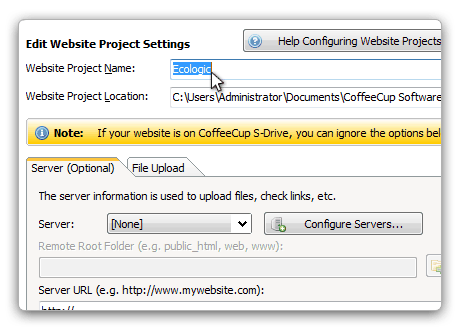
When it comes to websites, organization is key. A logical structure keeps things running smoothly and eliminates pesky issues like broken links and images. With that in mind, we designed Website Projects, a comprehensive and easy-to-use set of tools that gives you complete control over how your website is organized.
Create a file structure that fits your needs. Use intuitive tools like toolbars, right-click menus, and keyboard shortcuts to add elements to your pages. Create a website that looks great and performs even better.

Spend Less Time Coding
Using valid web standards, your pages display consistently in different browsers, work better with CSS, and are more accessible to disabled users and search engines. There’s also the satisfaction of knowing you’re doing things right. That’s why three tools are watching to ensure that you’re using valid code.
A comprehensive Tag Reference section puts the correct tags right at your fingertips. Code Completion automatically suggests tags as you type them and smartly suggests selectors from your referenced CSS files. A built-in validation tool allows you to check code of all types for perfectly valid pages every time.

Keep an Eye on Things
Even hardcore programmers can’t look at a page of code and know exactly how it’s going to look in a browser. That’s why the HTML Editor gives you instant visual support while you’re editing.
Utilize the split-screen preview to see your webpage displayed right below your code. Or use the external preview to display your page in another window or a second monitor. Want to experiment with some code? The preview shows you exactly what you’re working on as you create it. You can even see your page in a browser — in fact, you can open up to 10 different browsers from inside the HTML Editor.

Sync From Your Workspace
Uploading a finished website or a work-in-progress can be a pain. But syncing to S-Drive or uploading to another web host is a cinch with the HTML Editor, leaving you to the fun stuff.
Setting up S-Drive is just as easy as signing in to our website, and it’s blazing fast, too. When your project’s ready for the web, just choose the address you want to sync to and the HTML Editor takes care of the rest. Got your own server? Configure FTP uploading in seconds and enjoy the same one-click uploads that S-Drive users love. Publishing from your workspace means you can stay focused on the project at hand.

Preview Before Publishing
You want the public to see a picture-perfect website on their first visit. That’s why there are so many preview options. But what if you want to test it on the actual web, in a real browser — and share it with others? No worries; Quick Live Preview will save your butt.
Rather than publish each time you want to see your site on the web, you can generate a Quick Live Preview using the power of S-Drive. You’ll get a temporary URL that’s valid for 3 days so you can share your project across the web for group testing, or pop it into a whole spectrum of browsers to see rendering differences.

Control Your Website
With the HTML Editor you are in full control. And not just your code—you control where your website lives, too. Upload to any server or use our web platform with tons of perks. You can even use both, if you like.
Our web platform, S-Drive, is the most fun and effortless way to host your content. With file syncing straight from the program, a code editor in the file manager, web forms, HTML5 galleries, and more, we think it’s the best option.